https://growth-coder.tistory.com/253
이전 포스팅에서 Model input output에 대해서 알아보았다.
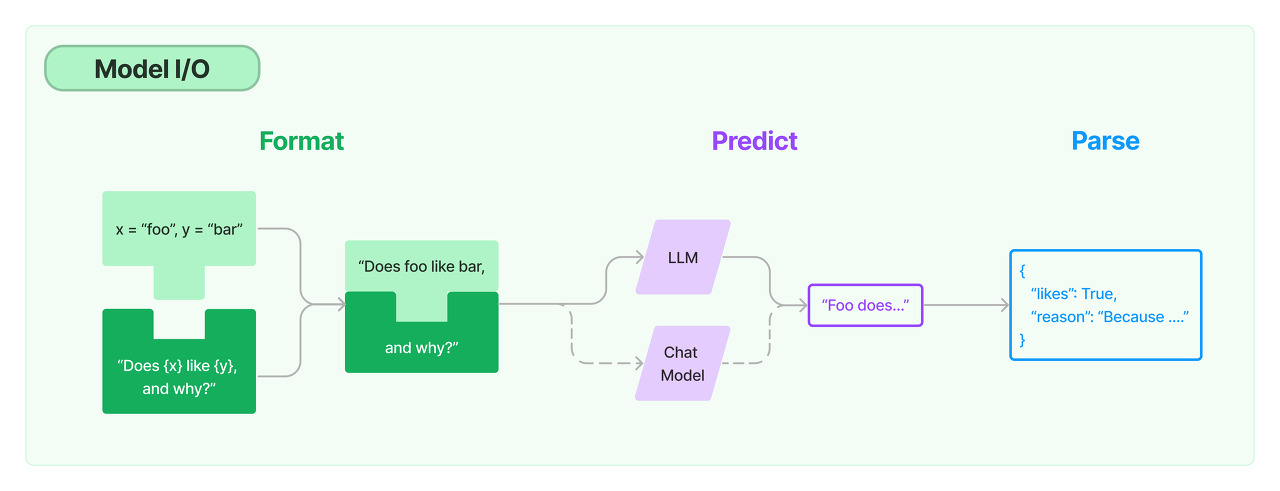
위 단계 중 Format을 보면 원하는 형식을 만들어서 거기에 끼워맞추는 모습을 볼 수 있다.
PromptTemplate과 ChatPromptTemplate을 사용하여 format을 해보자.
참고로 이전 포스팅과 마찬가지로 OPENAI_API_KEY가 환경 변수로 등록되어 있어야 한다.
PromptTemplate
from langchain.prompts import PromptTemplate
from langchain.chat_models import ChatOpenAI
chat = ChatOpenAI()
prompt_template = PromptTemplate.from_template(
    template = "translate {source} to {target} : {sentence}"
)
prompt = prompt_template.format(source = "english", target = "korean", sentence = "good morning!")
print(chat.predict(prompt))
출력
좋은 아침! (joh-eun achim!)
참고로 PromptTemplate의 format을 통해 prompt를 생성하면 이 prompt는 단순 String이다.
ChatPromptTemplate
from langchain.prompts import ChatPromptTemplate
from langchain.chat_models import ChatOpenAI
chat = ChatOpenAI()
prompt_template = ChatPromptTemplate.from_messages([
    ("system", "you are a helpful assistant that translates {source} to {target}"),
    ("human", "{sentence}")
])
prompt = prompt_template.format_messages(source="english", target="korean", sentence="my name is james.")
print(chat.predict_messages(prompt))
출력
content='제 이름은 제임스입니다.'
ChatPromptTemplate의 format_messages는 위 형식 외에도 아래와 같은 형식으로도 작성 가능하다.
from langchain.chat_models import ChatOpenAI
from langchain.prompts import HumanMessagePromptTemplate
from langchain.schema.messages import SystemMessage

chat_template = ChatPromptTemplate.from_messages(
    [
        SystemMessage(
            content=(
                "You are a helpful assistant that re-writes the user's text to "
                "sound more upbeat."
            )
        ),
        HumanMessagePromptTemplate.from_template("{text}"),
    ]
)

llm = ChatOpenAI()
llm(chat_template.format_messages(text='i dont like eating tasty things.'))
참고로 아래와 같이 이전 대화를 넣어서 기억하게 하는 것도 가능하다.
from langchain.prompts import ChatPromptTemplate
from langchain.chat_models import ChatOpenAI
chat = ChatOpenAI()
prompt_template = ChatPromptTemplate.from_messages([
    ("human", "My name is bob."),
    ("ai", "Hello! bob!"),
    ("human", "My hobby is football."),
    ("ai", "Wow! You are great!"),
    ("human", "{sentence}")
])
prompt = prompt_template.format_messages(sentence="What is my name and hobby?")
print(chat.predict_messages(prompt))
출력
content='Your name is Bob and your hobby is football.'
Caching
같은 요청을 보낼 때마다 계속 새로 생성된다면 시간적으로나 경제적으로나 부담이 될 수 있다.
만약 같은 요청이 많이 발생하는 작업이라면 이 요청을 저장해둔다면 API call 수도 줄일 수 있고 빠른 속도로 응답을 반환할 수 있다.
이러한 기능을 캐싱(Caching)이라고 한다.
<InMemoryCache>
from langchain.globals import set_llm_cache
from langchain.chat_models import ChatOpenAI
from langchain.cache import InMemoryCache

set_llm_cache(InMemoryCache())
llm = ChatOpenAI()
메모리 상에 저장한다.
set_llm_cache 안에 InMemoryCache를 넣는 모습을 확인할 수 있는데 여기에 SQLiteCache를 넣어주면 SQLite를 사용할 수 있다.
<SQLite>
from langchain.cache import SQLiteCache
set_llm_cache(SQLiteCache(database_path=".langchain.db"))
처음 실행한다면 현재 경로에 .langchain.db가 생성되는 모습을 확인할 수 있다.
Streaming
chat gpt를 사용해보면 응답을 생성할 때 키보드로 입력하는 것처럼 차례대로 출력되는 것을 볼 수 있다.
그런데 lang chain에서도 응답을 생성할 때 이 기능을 사용할 수 있다.
from langchain.callbacks.streaming_stdout import StreamingStdOutCallbackHandler
from langchain.chat_models import ChatOpenAI
chat = ChatOpenAI(streaming=True, callbacks=[StreamingStdOutCallbackHandler()])
chat.predict("Hello!")
이렇게 모델을 생성할 때 streaming 옵션을 True로 주고 callbacks에 StreamingStdoutCallbackHandler를 넣어주면 된다.
그리고 예측을 진행하면 chat gpt처럼 출력되는 모습을 확인할 수 있다.
Tracking token usage
context manager를 사용하여 토큰 사용량을 추적할 수 있다.
from langchain.callbacks import get_openai_callback
from langchain.chat_models import ChatOpenAI
chat = ChatOpenAI()
with get_openai_callback() as cb:
    print(chat.predict("hello!"))
    print(cb)
출력
Hello! How can I assist you today?
Tokens Used: 18
Prompt Tokens: 9
Completion Tokens: 9
Successful Requests: 1
Total Cost (USD): $3.15e-05
with get_openai_callback() as cb 구문 안에 있으면 토큰 사용량을 추적할 수 있다.
참고
https://python.langchain.com/docs/modules/model_io/models/llms/
LLMs | 🦜️🔗 Langchain
Head to Integrations for documentation on built-in integrations with LLM providers.
python.langchain.com
'공부 > AI' 카테고리의 다른 글
| [LangChain] Retrieval, RAG (document에서 검색하기) (0) | 2023.10.23 |
|---|---|
| [LangChain] Few Shot Prompting, Dynamic Few Shot Prompting (1) | 2023.10.21 |
| [LangChain] LangChain 개념 및 사용법 (0) | 2023.10.18 |
| [PyTorch] 긍정 리뷰, 부정 리뷰 분류하기 (3) - 모델 변경 (GRU) (0) | 2023.09.19 |
| [PyTorch] 긍정 리뷰, 부정 리뷰 분류하기 (2) - 구현 (임베딩, RNN) (0) | 2023.09.18 |